
How pg_lake works
pg_lake adds Iceberg tables and data lake files to PostgreSQL without changing how you use PostgreSQL. This page explains the moving parts, so that the behavior described in the rest of the documentation makes sense.
- Components
- Three kinds of tables
- What happens when you query
- What happens when you write
- Where things are stored
- Backups and replicas
Components
A pg_lake installation has two processes:
- PostgreSQL with the pg_lake extensions. Applications only ever connect here. The extensions hook into PostgreSQL’s planner, executor,
COPY, DDL and transaction handling. - pgduck_server, a separate multi-threaded process that runs DuckDB behind the PostgreSQL wire protocol, on a local Unix socket. pg_lake sends it the scanning, computation and file writing that DuckDB does well.
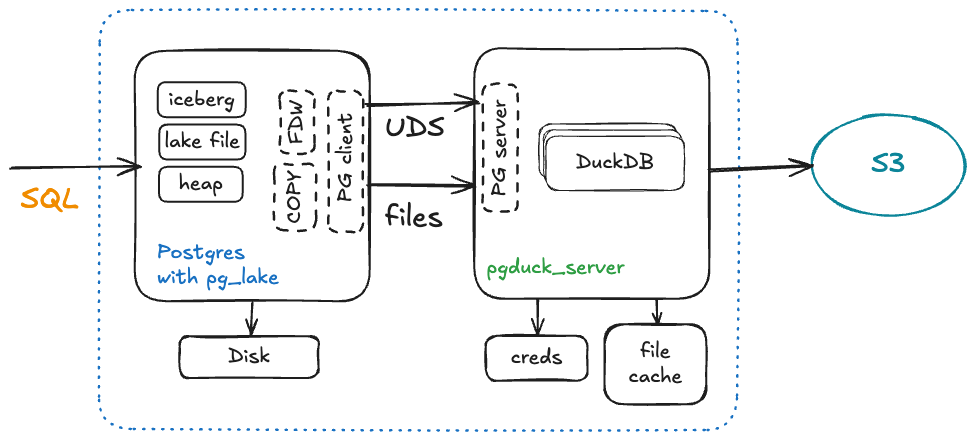
Running DuckDB in its own process avoids the problems of embedding a multi-threaded engine in PostgreSQL’s process-per-connection model, lets one DuckDB instance and one file cache serve all connections, and lets you connect to the engine directly with psql when you need to. pgduck_server loads a DuckDB extension, duckdb_pglake, that adds PostgreSQL-compatible functions and behavior.
The PostgreSQL side is split into several extensions, which CREATE EXTENSION pg_lake CASCADE installs together:
| Extension | Role |
|---|---|
pg_lake | Umbrella extension that depends on all of the ones below. |
pg_lake_table | Foreign data wrapper for data lake files and Iceberg tables, query pushdown, and writes. |
pg_lake_iceberg | The Iceberg specification: metadata, manifests, snapshots and catalogs. |
pg_lake_copy | COPY to and from URLs, and load_from / definition_from. |
pg_lake_engine | Shared layer: the connection to pgduck_server, file cache management, cleanup and permissions. |
pg_extension_base | Infrastructure for background workers, loaded through shared_preload_libraries. |
pg_lake_spatial | Optional: geospatial file formats and PostGIS integration. Installed separately. |
pg_map | Map types, used for Iceberg and Parquet maps. |
Three kinds of tables
pg_lake adds two kinds of tables next to PostgreSQL’s regular heap tables:
| Heap table | Iceberg table | Data lake file table | |
|---|---|---|---|
| Created with | CREATE TABLE | CREATE TABLE ... USING iceberg | CREATE FOREIGN TABLE ... SERVER pg_lake |
| Data stored in | PostgreSQL data directory | Parquet files and Iceberg metadata in object storage | Existing files in object storage or on the web |
| Writes | Yes | INSERT, UPDATE, DELETE, COPY | Read-only, or append-only with writable |
| Readable by other engines | No | Yes | They are just files |
| Good for | OLTP, point lookups | Analytics, large or growing data sets | Exploring and loading existing files |
All three can be used in the same query and the same transaction. load_from and COPY ... FROM load files into heap or Iceberg tables, and COPY ... TO writes any query result back out as files.
What happens when you query
When you query an Iceberg table or a data lake file table:
- PostgreSQL parses and plans the query as usual. pg_lake’s planner hook decides how much of the query DuckDB can run, from the whole query down to only reading the right columns and rows from the files (see query pushdown).
- For Iceberg tables, pg_lake uses its catalog and the Iceberg metadata to work out which data and delete files make up the table in your transaction’s snapshot, and skips files that the query’s filters rule out.
- pg_lake sends a query to pgduck_server that names those files. DuckDB reads them, from the local cache when it can, runs its part of the query in parallel, and streams the result back.
- PostgreSQL runs anything that remains, such as joins with heap tables, and returns the result.
What happens when you write
When you insert into, update or delete from an Iceberg table:
- The new rows are written to Parquet files, by DuckDB when the source can be pushed down (for example
INSERT ... SELECTfrom another lake table), otherwise from PostgreSQL through pgduck_server. Deletes and updates write position delete files or rewrite affected files. - The files are uploaded to object storage, and kept in the local cache.
- At commit, pg_lake writes new Iceberg manifests and a new metadata file, and updates its catalog in the same PostgreSQL transaction. The new snapshot becomes visible atomically, together with any heap table changes in the transaction.
- If the transaction aborts, the new files are never referenced, and VACUUM deletes them.
Because the catalog lives in PostgreSQL, Iceberg changes get the same guarantees as heap changes, including atomic multi-table transactions. Other engines see a new version of the table once the transaction commits.
Where things are stored
| What | Where |
|---|---|
| Table definitions, the Iceberg catalog, file lists, deletion queue | PostgreSQL system and extension tables |
| Iceberg data files (Parquet) and metadata (JSON and Avro) | Object storage, under the table’s location |
| Cached copies of remote files | Local disk, in pgduck_server’s --cache_dir |
| Object storage credentials | pgduck_server, through DuckDB secrets or the cloud provider’s credential chain |
PostgreSQL itself never holds object storage credentials; see configuration.
Backups and replicas
A physical backup or streaming replica of PostgreSQL contains pg_lake’s catalog, but not the files in object storage, which the catalog refers to. That works because Iceberg files are never modified in place, and pg_lake keeps files that are no longer referenced for pg_lake_engine.orphaned_file_retention_period (10 days by default):
- Replicas can query Iceberg tables. Keep them configured with the same pgduck_server credentials as the primary.
- Point-in-time restores find the files the restored catalog refers to, as long as the restore point is within the retention period. Keep the retention period longer than the oldest restore point you rely on.
- Restoring a copy while the original keeps running would leave two servers writing to the same Iceberg tables. After such a restore, run
CALL lake_table.finish_postgres_recovery();on the copy as a superuser. It marks the copy’s Iceberg tables read-only, so you can query them and copy data into new tables without affecting the original.
A pg_dump contains the definitions of Iceberg tables, and their data when you dump the data section; see copying tables from another server.