8 Workspace Bootstrap
setup_notebook() and configuration YAML
snowflake, R, RStudio, Posit, VS Code, workspace notebooks, snowflakeR, RSnowflake, mlops
8.1 Overview
After Workspaces & Notebooks, enable R in notebooks with snowflake-notebook-multilang package. Most enterprises follow two phases:
1. Organisation onboarding (usually IT or platform engineering) — Your Snowflake team builds a Custom Runtime Environment (CRE): a versioned container image with R, %%R, snowflakeR, RSnowflake, and your approved package set pre-installed. They register it in Snowflake (cre@<your_org_name>) and grant notebook roles access. Analysts then open Workspace with no bootstrap cell (reference CRE image) and go straight to %%R — startup is fast once the notebook container is running. This is the path most production teams adopt after a short pilot.
2. Self-serve bootstrap (this chapter’s main content) — While CRE is being set up — or for a solo proof-of-concept — a single Python cell runs setup_notebook() to install micromamba, R, tarballs, and %%R on the default runtime. It works without Docker or admin image builds, but runs on each notebook compute restart (after idle recycle). Typical time for a standard snowflakeR + RSnowflake configuration is ~60 seconds; more conda/CRAN packages, ADBC, or multilanguage options in your YAML add time (large stacks can reach several minutes).
You may use both: bootstrap during evaluation, or testing new R versions and packages; CRE once your organisation’s image is live.
8.2 Learning Objectives
- Run
setup_notebook()with a project YAML config - Structure
snowflaker_*.yamlfor context, EAI, and R tarballs - Explain who owns CRE setup (platform/IT) vs self-serve bootstrap (analyst PoC)
8.3 CRE vs bootstrap
| Org CRE (after IT/platform setup) | Self-serve bootstrap (setup_notebook()) |
|
|---|---|---|
| Who sets it up | Platform, ML ops, or IT (image build + Snowflake registration) | Individual analyst or data scientist |
| Typical timing | After pilot; ongoing image updates when packages change | Day one; before org CRE exists, or for customisation and experimentation |
First %%R |
Seconds (after container is up) — reference CRE auto-registers on kernel start | ~60s typical bootstrap; longer with extra packages |
| Governance | Image scanned in CI; pinned digest; one approved stack | Runtime downloads (EAI); per-notebook YAML |
| Analyst experience | Attach cre@<org_name> in advanced settings; often no setup cell |
One Python bootstrap cell per notebook (or project) |
| Still need bootstrap? | Optional — session context, EAI checks, one-off extras | Required on default Snowflake runtime |
Caching: CRE image layers cache on the registry/node after first pull. Kernel restart in the same session is cheap (R state persists in-process). Idle recycle starts new compute and re-runs bootstrap (~60s typical for standard config) unless you use a CRE.
8.4 Recommended: single bootstrap cell
Use the bootstrap script sfnb_setup.py from snowflake-notebook-multilang (same file is also in snowflakeR/inst/notebooks/).
How you use it depends on your project layout:
| Layout | What to do |
|---|---|
Notebook in the same folder as sfnb_setup.py |
from sfnb_setup import setup_notebook |
| Git repo cloned into Workspace (typical) | File is under snowflakeR/inst/notebooks/ — see filesystem paths below |
| No Git / minimal project | Copy sfnb_setup.py next to your notebook, or pip install sfnb-multilang and use the package API |
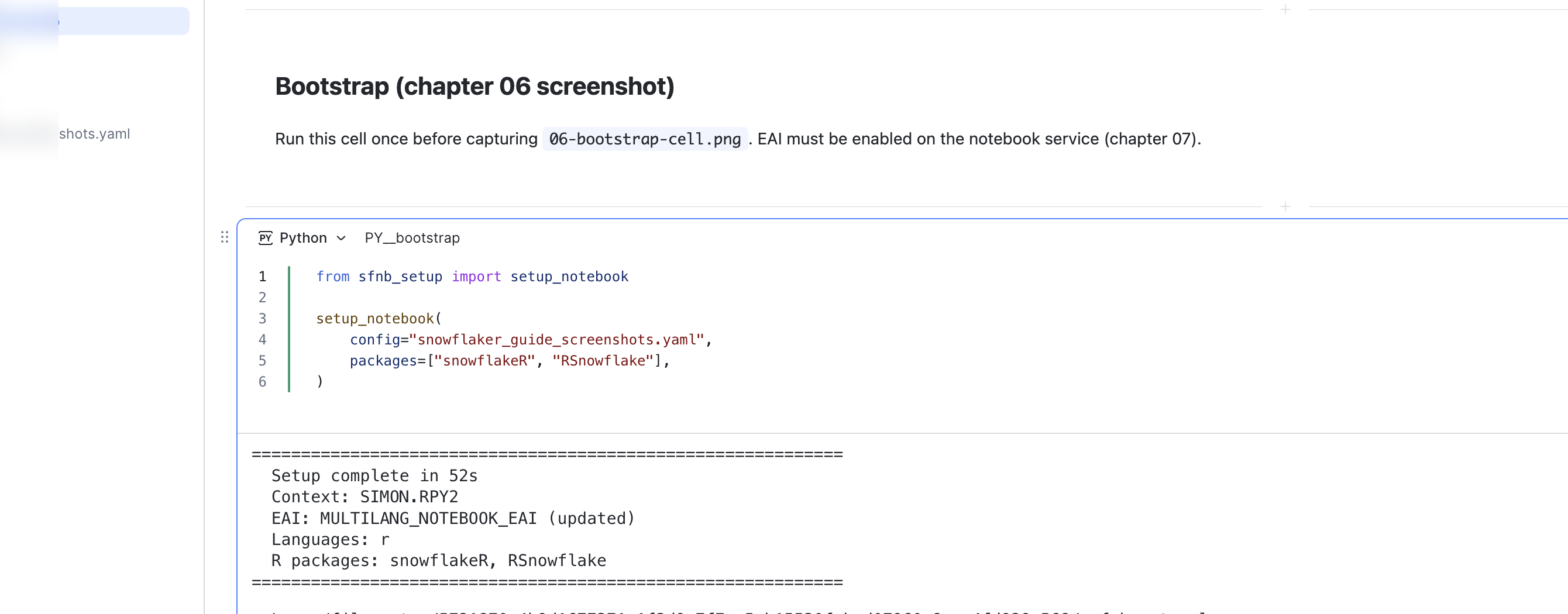
from sfnb_setup import setup_notebook

setup_notebook(
    config="snowflaker_config.yaml",
    packages=["snowflakeR", "RSnowflake"],
)
8.4.1 What setup_notebook() does
| Phase | Action |
|---|---|
| EAI | Discover/create External Access Integration for package downloads |
| micromamba | Install or reuse conda-compatible env manager |
| R runtime | Install R version from YAML |
| R packages | CRAN/conda packages + tarballs for snowflakeR/RSnowflake |
| Magic | Register %%R (and other languages if enabled) on IPython kernel |
| Context | Export SNOWFLAKE_* env vars for RSnowflake / snowflakeR |
| Session | Optionally apply warehouse/database/schema from YAML |
setup_notebook() is idempotent — re-run safely to add packages (edit YAML first). Use force_reinstall only when debugging a broken env.
packages= loads named R packages after bootstrap. Always list tarballs in YAML for production — Appendix B.
8.5 Configuration file essentials
snowflake:
  database: MY_DB
  schema: MY_SCHEMA
  warehouse: COMPUTE_WH
  role: MY_ROLE

languages:
  r:
    version: "4.3"
    packages:
      - tidyverse
      - arrow
    tarballs:
      - url: https://github.com/Snowflake-Labs/snowflakeR/releases/download/v0.x.x/snowflakeR_0.x.x.tar.gz
- url: https://github.com/Snowflake-Labs/RSnowflake/releases/download/v0.x.x/RSnowflake_0.x.x.tar.gzWherever possible, never compile snowflakeR / RSnowflake from source inside Workspace. Build tarballs with R CMD build --no-build-vignettes locally.
8.6 Notebooks deep in your Git repo
8.6.1 Why this matters
If your Workspace project is linked to Git, Snowflake mounts the repository inside the notebook container under:
/filesystem/<session-hash>/          ← root of your cloned repo (hash changes each session)
├── snowflakeR/inst/notebooks/
│   └── sfnb_setup.py                ← bootstrap script (if you use the Labs repos)
├── your_notebooks/                  ← your .ipynb may live elsewhere in the tree
└── ...
Problem 1 — finding sfnb_setup.py: from sfnb_setup import setup_notebook only works if that file is on Python’s path. It is not automatically next to every notebook — usually it sits in snowflakeR/inst/notebooks/.
Problem 2 — os.getcwd() is unreliable: Depending on Workspace version and restart state, os.getcwd() may return your notebook folder, a parent folder, or something else. Never use cwd-relative paths for config YAML or bootstrap imports.
Problem 3 — config paths: setup_notebook(config="snowflaker_config.yaml") resolves relative to cwd — which may be wrong. Pass an absolute path built from the discovered repo root.
8.6.2 Bootstrap pattern for notebooks outside snowflakeR/inst/notebooks/
Use this Python cell before setup_notebook() when your notebook is not in the same directory as sfnb_setup.py (for example under projects/my_analysis/):
import sys, os

_repo_root = None
for _h in os.listdir("/filesystem"):
    _p = os.path.join("/filesystem", _h, "snowflakeR", "inst", "notebooks")
    if os.path.isdir(_p):
        _repo_root = os.path.join("/filesystem", _h)
        sys.path.insert(0, _p)
        break

if _repo_root is None:
    raise RuntimeError("Could not find snowflakeR/inst/notebooks under /filesystem/")

from sfnb_setup import setup_notebook

_config = os.path.join(
    _repo_root,
    "projects", "my_forecast_demo",
    "snowflaker_config.yaml",
)

setup_notebook(config=_config, packages=["snowflakeR", "RSnowflake"])| Step | What it does |
|---|---|
Scan /filesystem/ |
Find the session-specific mount hash |
Check for snowflakeR/inst/notebooks |
Confirm this path exists under /filesystem/<hash>/ |
sys.path.insert(0, ...) |
Make sfnb_setup importable |
Absolute config= path |
YAML loads regardless of cwd |
Notebooks already in snowflakeR/inst/notebooks/ can import directly — no scan needed:
from sfnb_setup import setup_notebook
setup_notebook(config="snowflaker_config.yaml", packages=["snowflakeR"])
Full patterns: R Cells & Interop.
Prefer one shared copy of sfnb_setup.py in your repo (e.g. under snowflakeR/inst/notebooks/) and the path-discovery pattern below — rather than duplicating the file into every demo folder. That way upgrades from snowflake-notebook-multilang apply in one place.
8.7 Custom Runtime Images (for platform / IT teams)
If you are enabling R for an organisation (not only your own notebook), plan a one-time CRE onboarding project: build the reference v1 image with snowflake-notebook-multilang (docker/create_cre.sh + cre_profile.yaml — default tag sfnb-multilang-r:v1), push to your Snowflake image repository, register cre@<org_name>, and grant USAGE to notebook roles. That image registers %%R on kernel start (empty git repo is fine), includes snowflakeR, RSnowflake, and optional ADBC. Earlier internal image experiments are not a separate supported release — v1 is the first production reference.
Analysts only select the CRE in Workspace advanced settings — they do not run Docker. Share the notebook template after go-live.
Quick verify after attaching cre@<your_cre_name>:
%%R
cat(R.version.string, "\n")
packageVersion("snowflakeR")
requireNamespace("adbcsnowflake", quietly = TRUE)
library(snowflakeR)
sfr_connect()
Full end-to-end guide (build, push, register, customize packages): CRE & ML Jobs — Custom Runtime Images.
Toolkit docs (public repo): Organisation operating model, path matrix, notebook template.
Git-connected projects with renv (.Rprofile → renv/activate.R at the repo root) can hijack R on the /filesystem mount. Use the reference CRE (v1) image or enable_r_cells() from the bootstrap helpers — never raw %load_ext rpy2.ipython on those repos.