flowchart LR
  NB[Workspace notebook container]
  SF[Snowflake egress control]
  EXT[External hosts CRAN GitHub conda PyPI]

  NB -->|"blocked by default"| SF
  SF -.->|"no EAI"| EXT
  NB -->|"allowed with EAI + network rule"| SF
  SF --> EXT
9 Network & EAI
External access for R package installation
Keywords
snowflake, R, RStudio, Posit, VS Code, workspace notebooks, snowflakeR, RSnowflake, mlops
9.1 Overview
Snowflake Workspace Notebooks run inside a locked-down container. By default, all outbound network traffic is blocked — the notebook cannot reach CRAN, GitHub, conda, or PyPI unless your account explicitly allows it.
That is why bootstrap can fail with timeouts, or sometimes cryptic errors: setup_notebook() must fetch software from outside the account — by default from the public internet (micromamba, R, CRAN, GitHub tarballs, pip for rpy2). Snowflake governs that egress through network rules and External Access Integrations (EAI).
Alternative: Many enterprises route the same installs through an internal artifact repository (Artifactory, Nexus, or similar) configured in notebook YAML under mirrors:, with the R/Python packages you need already proxied or cached there. EAI then allows the mirror hostname (often one domain instead of dozens of public CDNs). See Enterprise mirrors and Appendix B — mirrors:. A CRE pre-bakes packages at image build time and avoids runtime downloads entirely.
This chapter explains EAI objects, how setup_notebook() discovers or creates them, what you must do in Snowsight after an admin runs SQL, and how mirrors simplify allowlists.
Prerequisites: Workspace Bootstrap calls EAI setup as part of setup_notebook().
9.2 Learning Objectives
- Explain why Workspace blocks egress and what EAI unlocks
- Describe network rules vs External Access Integrations vs session attachment
- Follow automatic, admin-assisted, and mirror-based EAI workflows
- Diagnose common bootstrap network failures
9.3 Why outbound access is blocked
Workspace notebooks run on ML Container Runtime — SPCS-backed services with enterprise security defaults. Unlike a laptop on the open internet, the container cannot open arbitrary HTTPS connections until:
- A network rule defines allowed destinations (hostnames or IP ranges)
- An External Access Integration binds that rule to services that may use it
- You attach the EAI to your notebook session in Snowsight
Without all three, micromamba install, install.packages(), and pip install hang or fail with DNS/connection errors — not because CRAN is down, but because Snowflake never routed the request outside the account.
Security intent: Data stays in-account; only declared package hosts are reachable. Production teams often use hostname allowlists rather than open 0.0.0.0/0 egress.
9.4 Core objects
| Object | What it is | Analogy |
|---|---|---|
| Network rule | Snowflake object listing permitted egress destinations (VALUE_LIST of hostnames, or IP CIDR) |
Firewall allowlist |
| External Access Integration (EAI) | Binds one or more network rules to notebook/container services that may use external access | Policy attaching allowlist to workloads |
| Session attachment | Per-notebook toggle in Snowsight enabling a specific EAI for this running session | Turning the policy on for your kernel |
| Authentication secret (optional) | Snowflake Secret referenced by EAI for authenticated corporate mirrors | Credentials for Artifactory/Nexus |
Creating SQL objects is not enough. Developers routinely miss the Snowsight Connected → Edit → External Access toggle — bootstrap objects exist but the session still cannot download packages.
9.5 What bootstrap downloads (and why each host matters)
setup_notebook() runs before R exists in the container. Phase 0 validates or creates EAI; subsequent phases download:
| Phase | What | Typical external hosts |
|---|---|---|
| micromamba | Conda-compatible installer + R base | micro.mamba.pm, conda.anaconda.org, repo.anaconda.com |
| pip (Python) | rpy2, sfnb-multilang, tabulate | pypi.org, files.pythonhosted.org |
| CRAN / pak | R packages, GitHub-sourced tarballs | cloud.r-project.org, github.com, api.github.com, objects.githubusercontent.com |
| Optional ADBC | Go toolchain + Arrow driver build | proxy.golang.org, storage.googleapis.com, R-universe hosts |
9.5.2 Optional add-ons
| Host | When required |
|---|---|
proxy.golang.org, storage.googleapis.com, … |
languages.r.addons.adbc: true in YAML |
repo1.maven.org |
Scala/Java multilang bootstrap |
| Internal mirror hostname only | Corporate mirrors: config — Mirrors |
Exact lists evolve with toolkit versions. When validation fails, bootstrap prints missing domains and may write eai_setup.sql.
Authoritative list: network_rules.md.
9.6 How setup_notebook() handles EAI
EAI management is privilege-aware — the toolkit never attempts operations your role cannot perform.
flowchart TD
  START[setup_notebook Phase 0]
  DISC[Discover target EAI]
  DNS[Test DNS for required domains]
  OPEN{Open EAI attached?}
  OK{All domains reachable?}
  ALTER[ALTER network rule add domains]
  CREATE[CREATE supplementary EAI]
  SQL[Print eai_setup.sql for admin]
  ATTACH[Remind: enable toggle in Snowsight]
  CONT[Continue bootstrap downloads]

  START --> DISC --> DNS --> OPEN
  OPEN -->|yes| CONT
  OPEN -->|no| OK
  OK -->|yes| ATTACH --> CONT
  OK -->|no| ALTER
  ALTER -->|success| ATTACH
  ALTER -->|fail| CREATE
  CREATE -->|success| ATTACH
  CREATE -->|fail| SQL
9.6.1 EAI discovery priority
When selecting which EAI to modify, setup_notebook() uses first match wins:
| Priority | Source |
|---|---|
| 1 | eai.managed in YAML — admin-precreated team EAI (recommended) |
| 2 | Convention name MULTILANG_NOTEBOOK_EAI (or eai.supplementary_name) |
| 3 | DESC SERVICE when SNOWFLAKE_SERVICE_NAME is set (scheduled runs) |
| 4 | .snowflake/settings.json hint (best-effort) |
| 5 | SHOW EXTERNAL ACCESS INTEGRATIONS visible to role |
The toolkit operates on one target EAI — it does not iterate all visible integrations.
9.6.2 When domains are missing
| Situation | Action |
|---|---|
| Managed EAI in YAML | ALTER NETWORK RULE to append missing hostnames |
| ALTER fails (no privilege) | Create supplementary EAI with only missing domains |
| No managed EAI | DNS test first; CREATE supplementary if unreachable |
| CREATE fails | Print annotated SQL — which domains exist elsewhere vs new |
9.6.3 Open EAI shortcut
If an attached EAI uses 0.0.0.0/0 (open egress), bootstrap skips domain patching — common in sandboxes; avoid in production.
9.6.4 YAML configuration
eai:
  managed: "TEAM_NOTEBOOK_EAI"              # ALTER target (recommended)
  supplementary_name: "MULTILANG_NOTEBOOK_EAI"  # name if auto-created
9.7 Developer workflow
9.7.1 Step 1 — Run bootstrap
from sfnb_setup import setup_notebook
setup_notebook(config="snowflaker_config.yaml", packages=["snowflakeR", "RSnowflake"])
Watch output for:
- ✅ Domains reachable — proceed
- ⚠️ SQL printed /
eai_setup.sqlwritten — admin step required - ❌ Timeout on download after EAI exists — toggle not enabled (Step 3)
9.7.2 Step 2 — Admin runs SQL (if needed)
Share eai_setup.sql with ACCOUNTADMIN or integration owner. SQL includes:
CREATE NETWORK RULEwithVALUE_LISTof hostnamesCREATE EXTERNAL ACCESS INTEGRATIONlinking the rule- Grants so your role can use the integration
Generated manually without bootstrap:
9.7.3 Step 3 — Attach EAI in Snowsight (required)
Even after SQL succeeds, attach external access to the notebook compute service:
- Open the notebook and start or select a Connected session
- Click Connected (toolbar) → review Enabled EAI’s on the service (or Change service / Create new service to pick EAIs when provisioning compute)
- If bootstrap still times out, the service likely has no EAI — create or edit the notebook compute service and attach your integration
- Re-run bootstrap if the first attempt failed mid-download
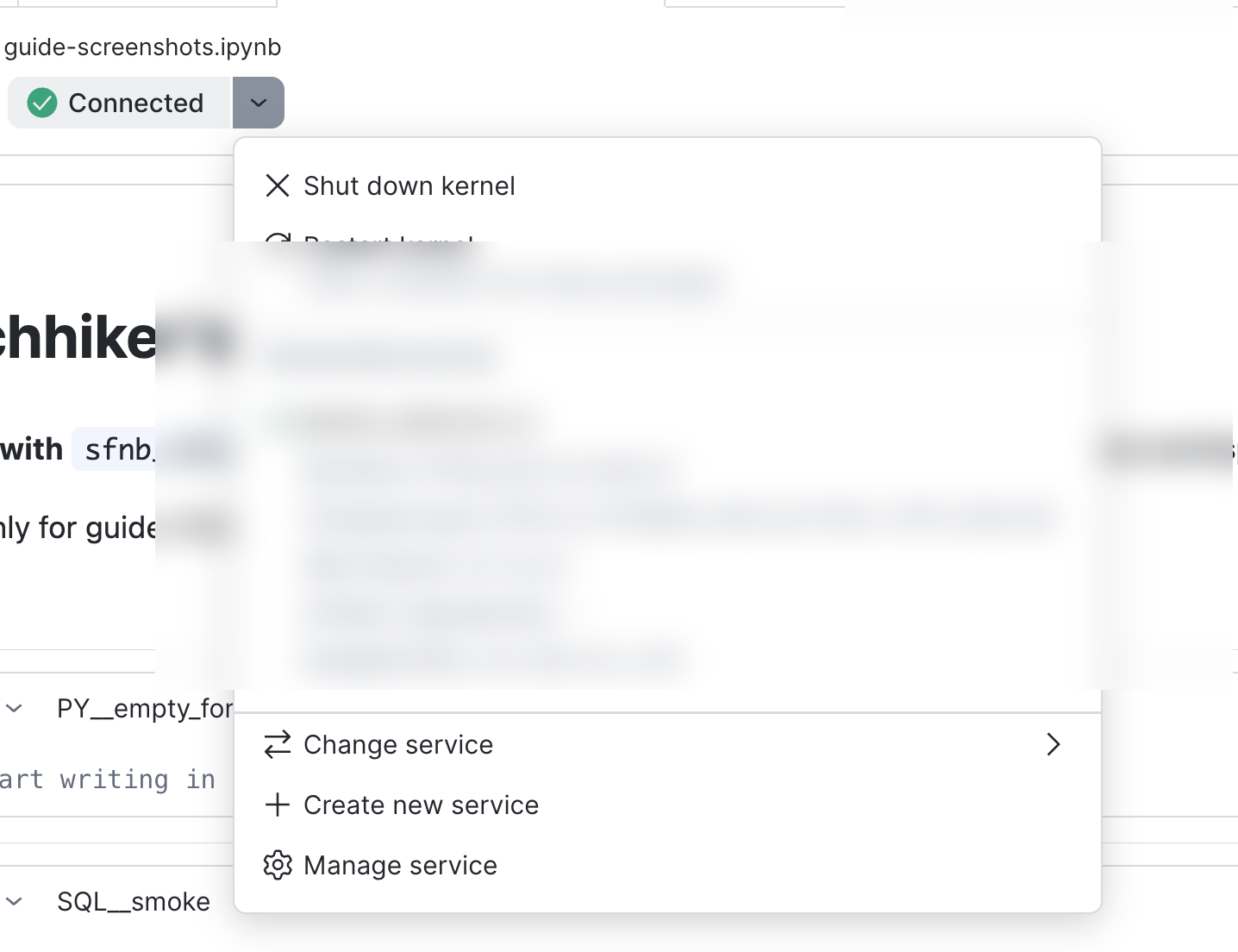
One-time per account setup, reuse across notebooks: The same EAI can serve many notebook services once created — each service must list the integration under Enabled EAI’s (or you attach it when creating compute).
9.7.4 Dynamic rule updates
When an admin ALTERs a network rule, changes apply to running notebook services without kernel restart (Snowflake SPCS behavior). You still need the EAI attached to the session.
9.8 Enterprise mirrors and artifact repositories
If all package traffic routes through a corporate artifact repository (Artifactory, Nexus, Sonatype, or an internal generic proxy), the EAI allowlist can collapse to one hostname instead of dozens of public CDNs. Your platform team must publish or proxy the same artifacts bootstrap expects (micromamba, conda-forge R stack, CRAN/pak sources, PyPI, GitHub tarballs for snowflakeR/RSnowflake) — then point mirrors: at those URLs.
mirrors:
  conda_channel: "https://artifactory.corp.example.com/conda-forge/"
  pypi_index: "https://artifactory.corp.example.com/pypi/simple"
  cran_mirror: "https://artifactory.corp.example.com/cran/"
Bootstrap derives EAI domains from mirrors: in YAML — public upstream hosts are replaced by mirror host(s).
9.8.1 Authenticated mirrors
When mirrors require credentials:
mirrors:
  conda_channel: "https://artifactory.corp.example.com/conda-forge/"
  auth_secret: "MY_DB.MY_SCHEMA.ARTIFACTORY_CREDS"
Generated EAI SQL includes ALLOWED_AUTHENTICATION_SECRETS so the container can read the Snowflake Secret at runtime.
See custom_mirrors.md and artifact_repository_support_summary.md (compliance-oriented walkthrough).
9.9 EAI and other workloads
| Workload | EAI relevance |
|---|---|
| Cold bootstrap | EAI required for public internet or internal artifact mirror (mirrors:) |
| CRE pre-baked image | Runtime may skip downloads; build-time EAI still needed when building image in-account |
| SPCS doSnowflake workers | Separate network rules if workers fetch external packages at runtime |
| Model Registry inference | Conda env in image — build-time egress; not the same as notebook bootstrap |
| Posit / local R | No Workspace EAI — uses corporate network on your laptop |
Skipping EAI setup in YAML when custom_runtime.prebaked: true and skip_eai_when_prebaked: true is valid only when all dependencies are already in the image (CRE chapter).
9.10 Troubleshooting
| Symptom | Likely cause | Fix |
|---|---|---|
Connection timed out during micromamba |
No EAI attached to session | Snowsight External Access toggle |
Connection refused to CRAN |
Hostname missing from network rule | Re-run bootstrap; admin ALTER/CREATE |
| GitHub tarball 403/404 | GitHub hosts not in rule | Add github.com, objects.githubusercontent.com, … |
| Works once, fails after restart | Toggle not re-enabled | Re-attach EAI each new session |
| Admin ran SQL, still fails | Wrong EAI toggled or role lacks USAGE on integration | Verify integration name matches YAML eai.managed |
| ADBC install fails | Go module hosts blocked | Add golang proxy hosts or disable addons.adbc |
| Everything allowed but slow | Corporate proxy / mirror misconfig | Verify mirrors: URLs |
More: Appendix C: Troubleshooting, Appendix B — eai YAML.
9.11 Security considerations
- Prefer hostname allowlists over open egress in production
- Scope EAIs to team notebooks — separate dev vs prod integrations if policies differ
- Secrets for mirrors live in Snowflake Secret objects — not in notebook cells
- Security team review: share bootstrap-generated
eai_setup.sqland domain summary annotations - Document which external hosts each notebook config requires before approval
9.12 Companion material
| Resource | Content |
|---|---|
| network_rules.md | Full host lists, discovery, hybrid strategy |
| custom_mirrors.md | Artifactory/Nexus setup |
| Snowflake docs — External network access | Product reference |
| Bootstrap | Where EAI fits in setup_notebook() |
9.13 Next steps
R Cells & Interop — after bootstrap and EAI succeed, run your first %%R cells.