flowchart TB
  subgraph interactive [Interactive development]
    COLD["Workspace + cold bootstrap<br/>~60s typical / restart"]
    CRE["Workspace + CRE<br/>~2s session start"]
  end

  subgraph batch [Scheduled / batch]
    JOB["ML Job + CRE<br/>non-interactive"]
  end

  subgraph parallel [Massively parallel R]
    SPCS["SPCS + doSnowflake<br/>custom worker Docker"]
  end

  subgraph serve [Model serving]
    INF["Registry inference service<br/>separate image surface"]
  end

  COLD --> CRE
  CRE --> JOB
  JOB -.->|different purpose| INF
  CRE -.->|different purpose| SPCS
11 CRE & ML Jobs
Custom runtime images and batch execution beyond notebooks
Keywords
snowflake, R, RStudio, Posit, VS Code, workspace notebooks, snowflakeR, RSnowflake, mlops
11.1 Overview
Workspace Notebooks are the default interactive surface for R on Snowflake — but every new session that runs cold setup_notebook() pays a bootstrap tax: micromamba, R, packages, EAI checks, and %%R registration. That is fine for exploration; it is expensive for teams that restart notebooks very regularly or run scheduled batch workloads.
Two Snowflake features address that:
| Extension | What it solves |
|---|---|
| Custom Runtime Images (CRE) | Pre-bake R + packages into a governed container — session start in ~seconds |
| ML Jobs | Run the same container runtime non-interactively on a schedule or trigger |
This chapter explains when each tier applies, how CRE relates to bootstrap, and why ML Job images are not the same as Model Registry inference images.
Warning
CRE and ML Jobs are new and evolving Snowflake product areas. Verify against Snowflake ML Container Runtime and Custom Runtime Images documentation.
11.2 Learning Objectives
- Explain cold bootstrap cost and what CRE pre-bakes (including
%%Ron kernel start) - Build, push, register, and attach a multilang-R CRE image end-to-end
- Customize the image with extra R/Python packages at build time or runtime
- Choose Workspace vs CRE vs ML Jobs vs SPCS workers
- Distinguish notebook CRE from Model Registry inference images
11.3 The execution tiers
| Tier | Kernel / runtime | R bootstrap | Best for |
|---|---|---|---|
| Workspace cold | ML Container Runtime | Full setup_notebook() (~60s typical / restart) |
Pilot, demos, changing packages often |
| Workspace + CRE | Same runtime, custom image | Skip install — packages in image | Team notebooks, frequent restarts |
| ML Job + CRE | ML Container Runtime (batch) | Pre-baked or bootstrap at job start | Nightly retrain, scheduled ETL in R |
| SPCS doSnowflake | Compute pool workers | Worker Docker image | Thousands of parallel %dopar% iterations |
| Registry deploy | Inference service image | conda-forge + rpy2 serve path | Online REST predict — Model Registry |
11.4 Why cold bootstrap is slower than using a CRE
First setup_notebook() in a fresh Workspace session typically:
- Resolves EAI (network rules for CRAN, conda, GitHub)
- Installs or activates micromamba (~2 GB disk for R + tidyverse stack)
- Installs CRAN/conda packages from YAML
- Installs snowflakeR / RSnowflake tarballs
- Registers
%%RIPython magic via rpy2
Expect ~60 seconds per compute restart for a typical snowflakeR + RSnowflake YAML configuration. Additional conda/CRAN packages, ADBC, DuckDB, or multilanguage installs increase that time (several minutes for heavy stacks). Each idle recycle starts a new container and re-runs bootstrap unless you use a CRE.
CRE moves steps 2–4 into the image build — runtime only verifies versions and registers magic if needed.
11.5 Custom Runtime Images (CRE)
11.5.1 What CRE is
A Custom Runtime Image is a Docker image you build, push to a Snowflake image repository, register as a Custom Runtime Environment, and attach to Workspace Notebooks (or ML Jobs). It must extend the official snowbooks ML runtime — you add R and tooling on top; you do not replace Snowflake’s entrypoint or mandatory Python packages.
CRE answers: “Why should every session pay 45+ seconds and run bootstrap cells just to get %%R and snowflakeR?” A well-built CRE starts the kernel with R, packages, ADBC, helpers, and %%R already wired — including on container restart.
Reference implementation: snowflake-notebook-multilang (docker/Dockerfile.multilang-r, docker/install_prebaked_r.sh).
11.6 End-to-end: build a multilang-R CRE (reference v1)
Validated workflow: local docker build → docker push → CREATE OR REPLACE CUSTOM RUNTIME ENVIRONMENT → create notebook compute + attach CRE in Snowsight → %%R on kernel start without a setup cell.
11.6.1 What you are building — example
flowchart TB
  subgraph base [Snowflake base — required]
    SB["snowbooks:2.5.0<br/>Jupyter + Snowpark + ML runtime"]
  end

  subgraph bake [Your CRE layer — image build time]
    MM["micromamba + workspace_env"]
    RPK["R 4.5.2 + tidyverse / dbplyr / DBI"]
    SF["snowflakeR + RSnowflake tarballs"]
    ADBC["ADBC stack"]
    PY["rpy2 + sfnb-multilang"]
    HOOK["IPython startup → %%R"]
    CFG["/opt/sfnb/config/cre_multilang_r.yaml"]
  end

  subgraph register [Register in account]
    REG["CREATE CUSTOM RUNTIME ENVIRONMENT<br/>IMAGE_PATH = …/sfnb-multilang-r:v1"]
  end

  subgraph attach [Analyst — Snowsight notebook session]
    POOL["Notebook compute pool / service<br/>(ML Container Runtime)"]
    SEL["Connected → Edit → Runtime<br/>select cre@sfnb_multilang_r"]
    K["Kernel: [sfnb CRE] %%R ready"]
    CELLS["%%R + sfr_connect()"]
  end

  SB --> MM --> RPK --> SF --> ADBC --> PY --> HOOK --> CFG
  CFG --> REG --> POOL --> SEL --> K --> CELLS
| Layer | Location | Purpose |
|---|---|---|
snowbooks base |
Snowflake image | Kernel, Snowpark, CRE validation |
micromamba + workspace_env |
~/micromamba, ~/.workspace_env_prefix |
Same paths as cold bootstrap |
| snowflakeR / RSnowflake | R library | Tarballs at build time |
| ADBC | R + conda | adbcdrivermanager, adbcsnowflake, libadbc-driver-snowflake |
| rpy2 + sfnb-multilang | snowbooks Python | setup_notebook, enable_r_cells |
| IPython startup | ~/.ipython/profile_default/startup/ |
%%R on kernel start/restart |
| Preset YAML | /opt/sfnb/config/cre_multilang_r.yaml |
Optional runtime setup_notebook() |
| Env var | Meaning |
|---|---|
SFNB_CUSTOM_RUNTIME=1 |
Skip micromamba reinstall in setup_notebook() |
SFNB_CRE_VERSION |
Image recipe tag (e.g. v1) |
11.6.2 Prerequisites
| Requirement | Notes |
|---|---|
| Role with CRE + image repo privileges | Often ACCOUNTADMIN first; GRANT USAGE ON CUSTOM RUNTIME ENVIRONMENT to notebook roles |
| Image repository | e.g. MYDB.MYSCHEMA.MY_CRE_IMAGES |
Docker + Snowflake CLI (snow) |
linux/amd64 build; snow spcs image-registry login; snow custom-image validate (see below) |
| Build-time egress | Pull base image, conda, tarballs, r-multiverse (ADBC) |
Note
SPCS Image Builder (snow spcs service build-image, CLI 3.16+ preview) builds in-account. Use docker/prepare_build_ctx.sh for a flat context. If the job fails with no space left on device, use local Docker build + push.
11.6.3 Step 1 — Clone toolkit and set registry
11.6.4 Step 2 — Build and validate
Important
Requires the Snowflake CLI (snow). Steps below use snow spcs image-registry login and snow custom-image validate. Install the CLI locally, configure a connection (snow connection add), then pass -c <connection> or set SNOWFLAKE_CONNECTION. You can push with docker push after snow spcs image-registry login if you prefer not to use the toolkit’s PUSH=1 wrapper.
Runs docker build --platform linux/amd64 and snow custom-image validate sfnb-multilang-r:v1 (20 checks — must pass).
11.6.5 Step 3 — Push
Pushes to {REGISTRY_URL}/{IMAGE_REPO_PATH}/sfnb-multilang-r:v1.
11.6.6 Step 4 — Register CRE
USE ROLE ACCOUNTADMIN;

CREATE OR REPLACE CUSTOM RUNTIME ENVIRONMENT sfnb_multilang_r
    IMAGE_PATH = '/MYDB/MYSCHEMA/MY_CRE_IMAGES/sfnb-multilang-r:v1'
    BASE_IMAGE_TYPE = CPU;

DESCRIBE CUSTOM RUNTIME ENVIRONMENT sfnb_multilang_r;
-- CRE_STATUS = RESOLVED

GRANT USAGE ON CUSTOM RUNTIME ENVIRONMENT sfnb_multilang_r TO ROLE <notebook_role>;
11.6.7 Step 5 — Attach to Workspace
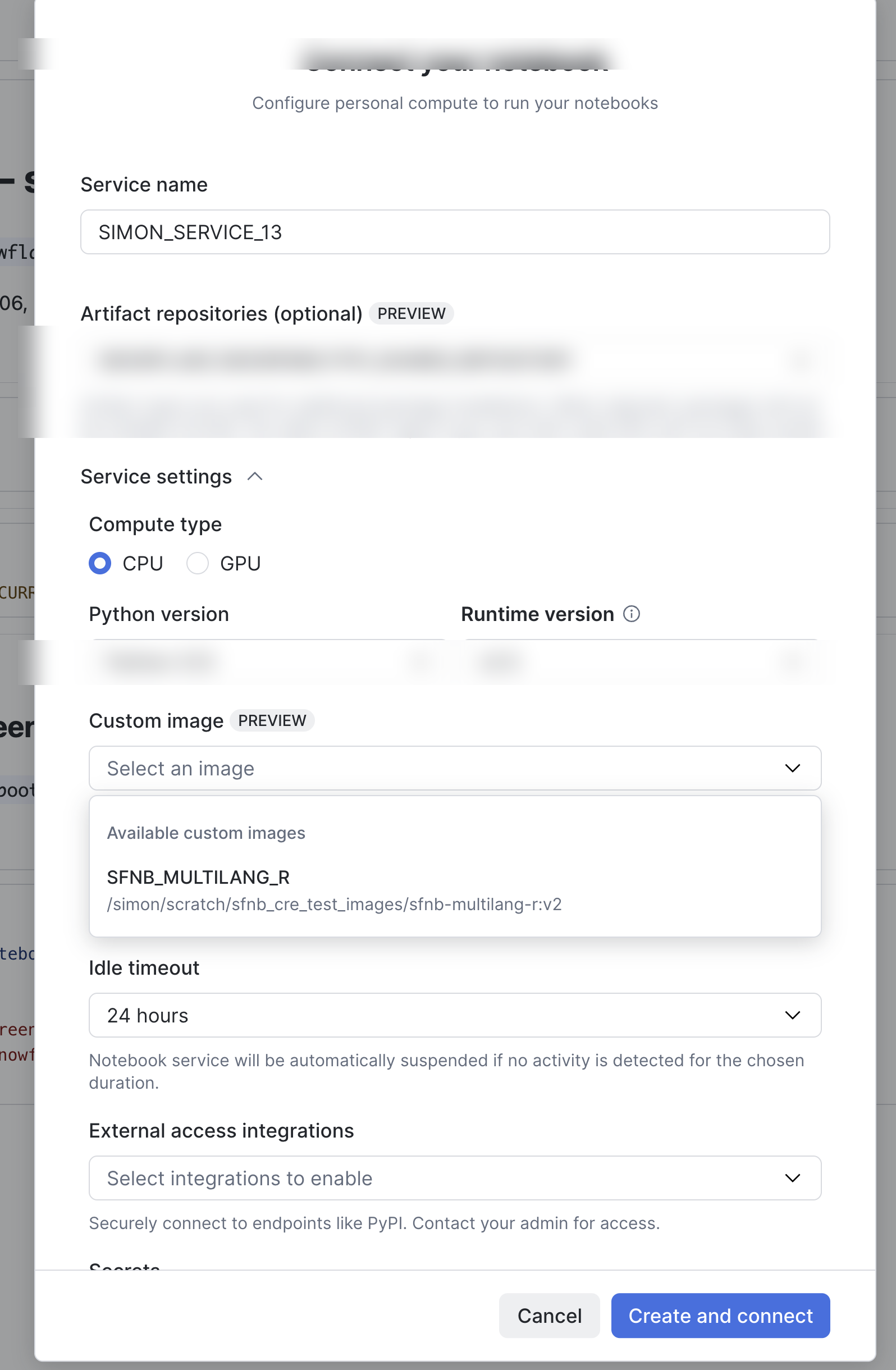
Snowsight (recommended):
- Open or create a Workspace notebook (Workspaces overview).
- Connect (or Connected → Edit) to start or edit the notebook compute session.
- Under Runtime / Custom Runtime Environment, select your registered image — e.g.
cre@sfnb_multilang_r(name matchesCREATE CUSTOM RUNTIME ENVIRONMENT). - Set role, warehouse, and database/schema context, then Save and start the session.
Without a CRE selected, the notebook uses the default ML Container Runtime and you still need the Python setup_notebook() bootstrap for R.
SQL (automation / CI):
EXECUTE NOTEBOOK PROJECT MYDB.MYSCHEMA.MY_PROJECT
    MAIN_FILE = 'notebook.ipynb'
    RUNTIME = 'cre@sfnb_multilang_r'
    QUERY_WAREHOUSE = 'MY_WH';
An empty git project is fine — the image carries R and helpers.
11.6.8 Step 6 — Verify (no bootstrap cell)
The sfnb CRE startup hook prints a banner when the Python kernel starts (not at Docker build time):
%%R
requireNamespace("adbcsnowflake", quietly = TRUE)
library(snowflakeR)
conn <- sfr_connect()
conn
Expect Connected via active Workspace Notebook session.
11.6.9 Reference image (v1) vs cold bootstrap
The sfnb-multilang-r:v1 reference image is the first supported CRE release (earlier local experiments were not published as a product version).
| Capability | Reference CRE (:v1) |
Cold setup_notebook() only |
|---|---|---|
Auto %%R on kernel start |
Yes | No — bootstrap cell required |
| sfnb-multilang + IPython startup hook | Yes | Installed at runtime |
| ADBC (optional at build) | Yes | Optional at runtime |
11.6.10 How kernel auto-registration works
install_prebaked_r.sh installs 00-sfnb-enable-r.py under ~/.ipython/profile_default/startup/. On every kernel start or restart it:
- Points R at the pre-baked micromamba env (skips repo renv on
/filesystem) - Calls
setup_r_environment()from sfnb-multilang - Registers
%%R
No Git copy of sfnb_setup.py required for magic — pip-installed sfnb-multilang is in the image.
sequenceDiagram
  participant User as Analyst
  participant WS as Workspace kernel
  participant Hook as IPython startup
  participant R as Embedded R

  User->>WS: Open or restart notebook
  WS->>Hook: sfnb startup hook
  Hook->>R: setup_r_environment
  Hook-->>User: CRE ready for R cells
  User->>R: library snowflakeR and connect
11.7 Customizing the image
11.7.1 Profile-driven build (recommended for teams)
The snowflake-notebook-multilang repo ships a one-command workflow so you do not hand-edit the install script for every extra package.
cd snowflake-notebook-multilang
./docker/create_cre.sh --init my_team          # copies example profile
# edit configs/my_team.yaml — registry, repo path, extras
PUSH=1 SNOW_CONNECTION=my_conn ./docker/create_cre.sh configs/my_team.yaml
configs/cre_profile.example.yaml lists:
| Field | Purpose |
|---|---|
cre.name / cre.tag |
Snowflake CRE name and Docker tag |
snowflake.registry_url |
Account image registry host |
snowflake.image_repo_path |
Lowercase db/schema/repo for push |
extras.conda_r |
Extra conda-forge R packages |
extras.cran |
Extra CRAN packages at build time |
extras.pip |
Extra pip packages on the notebook kernel |
tarballs.snowflakeR / RSnowflake |
Pin release tarball URLs |
create_cre.sh renders docker/generated/cre_extra_install.sh, runs build_cre.sh, validates with snow custom-image validate, optionally pushes, and prints docker/generated/cre_register.sql.
11.7.2 Pinning package versions (reproducibility)
Production CREs should be reproducible: same image tag → same R/Python stack. Use a combination of image tag, pinned tarballs, and versioned package specs.
| Layer | How to pin | Example |
|---|---|---|
| Image identity | cre.tag + version_label in profile; bump on every rebuild |
tag: v1, version_label: v1.20260529 |
| R base | cre.r_version and conda r-base= |
r_version: "4.5.2" → r-base=4.5.2 in micromamba |
| snowflakeR / RSnowflake | tarballs: URLs to a specific GitHub release |
.../releases/download/v0.1.0/snowflakeR_0.1.0.tar.gz |
| Conda R packages | conda-forge specs in extras.conda_r or CONDA_PACKAGES |
r-reticulate>=1.25, r-dplyr=1.1.4, r-fable=0.4.0 |
| CRAN packages | Pin in extras.cran + build script installs at fixed CRAN snapshot date, or use remotes in a generated R block |
Prefer conda-forge when a recipe exists |
| Python (kernel) | extras.pip with == or >= |
rpy2==3.5.17, scikit-learn>=1.3,<2 |
| snowbooks base | cre.snowbooks_tag in profile |
snowbooks_tag: "2.5.0" |
Profile example (configs/my_team.yaml):
cre:
  name: my_team_multilang_r
  image: sfnb-multilang-r
  tag: v1.20260529
  version_label: v1.20260529
  r_version: "4.5.2"
  snowbooks_tag: "2.5.0"

tarballs:
  snowflakeR: "https://github.com/Snowflake-Labs/snowflakeR/releases/download/v0.1.0/snowflakeR_0.1.0.tar.gz"
  RSnowflake: "https://github.com/Snowflake-Labs/RSnowflake/releases/download/v0.2.0/RSnowflake_0.2.0.tar.gz"

extras:
  conda_r:
    - r-fable=0.4.0
    - r-lme4=1.1-35
  cran: []   # prefer conda pins when available
  pip:
    - "rpy2>=3.5,<4"
    - "tabulate>=0.9"
The reference install_prebaked_r.sh already pins core stack versions (see r-base=${R_VERSION}, r-reticulate>=1.25, tarball env vars). Team extras are merged by create_cre.sh into cre_extra_install.sh.
Note
CRAN vs conda: CRAN install.packages() at build time resolves latest matching the repo mirror unless you pin via conda-forge (r-package=version) or install from a fixed tarball / remotes::install_version(). For auditability, record the build date and conda list / pip freeze output in your CI logs.
11.7.3 At image build time (advanced)
Edit docker/install_prebaked_r.sh, bump tag, rebuild, push, CREATE OR REPLACE CRE.
Extra conda R packages — extend CONDA_PACKAGES with version constraints:
CONDA_PACKAGES=(
  "r-base=${R_VERSION}"
  "r-tidyverse"
  "r-fable=0.4.0"
  "r-lme4=1.1-35"
  "r-reticulate>=1.25"
)
Extra CRAN packages — add an R block after tarball install (pin with remotes when you need an exact CRAN version):
"${R_BIN}" --vanilla -e "
  install.packages('remotes', repos='${CRAN_MIRROR}', quiet=TRUE)
  remotes::install_version('survival', version='3.5-8', repos='${CRAN_MIRROR}')
"
Disable ADBC (smaller image): SFNB_CRE_ADBC=0 ./docker/build_cre.sh
Extra Python packages — pin in pip:
"${NOTEBOOK_PY}" -m pip install -q --break-system-packages \
  'rpy2>=3.5,<4' 'tabulate>=0.9' 'scikit-learn==1.5.2'
Pin snowflakeR / RSnowflake tarballs (required for team reproducibility):
export SNOWFLAKER_TARBALL="https://github.com/Snowflake-Labs/snowflakeR/releases/download/v0.1.0/snowflakeR_0.1.0.tar.gz"
export RSNOWFLAKE_TARBALL="https://github.com/Snowflake-Labs/RSnowflake/releases/download/v0.2.0/RSnowflake_0.2.0.tar.gz"| Build variable | Default |
|---|---|
SFNB_R_VERSION |
4.5.2 |
SFNB_CRE_ADBC |
1 |
SFNB_CRE_IMAGE_TAG |
v1 |
SNOWBOOKS_TAG |
2.5.0 (Docker build arg) |
11.7.4 At notebook runtime (flexible)
For occasional packages — requires notebook EAI if downloading:
from sfnb_setup import setup_notebook
setup_notebook(config="/opt/sfnb/config/cre_multilang_r.yaml")| Strategy | Best for |
|---|---|
| Bake in CRE | Team standard stack — reproducible, fast every session |
setup_notebook() in project YAML |
Project-specific extras with version control |
Ad hoc install.packages |
One-off experiments only |
YAML preset with custom_runtime.skip_eai_when_prebaked: true when nothing is downloaded at runtime — see configs/cre_multilang_r.yaml.
11.8 Inspecting kernel and container logs
There is no documented, stable path to a Jupyter “kernel stdout file” in Workspace (for example /tmp/jupyter.log). Use the paths below by failure phase.
11.8.1 Phase A — CRE registration fails (CREATE CUSTOM RUNTIME ENVIRONMENT)
Snowflake validates the image before any notebook kernel runs. Fix locally first:
Check SQL output from DESCRIBE CUSTOM RUNTIME ENVIRONMENT <name>; — status and error text refer to image contract (entrypoint, DASHBOARD_PORT, base image type), not R startup.
11.8.2 Phase B — Notebook session starts but R / %%R fails
| Approach | What you get |
|---|---|
| Functional test | Run %%R cat(1) — if it works, startup succeeded regardless of banner |
| Workspace Terminal | Live shell in the notebook container: env \| grep SFNB, ps -ef \| grep -i jupyter, inspect /opt/sfnb/CRE_VERSION |
| Run history → Logs | Kernel + infra logs for scheduled Notebook Project runs; interactive sessions may expose similar views depending on Snowsight version |
| Account event table | Container logs ingested for query (often 3–5 minute delay); filter by notebook service name |
Find your event table:
Then (adjust database, schema, table, and service name):
SELECT
  TIMESTAMP,
  VALUE AS LOG_MESSAGE,
  RESOURCE_ATTRIBUTES:"snow.service.name"::string AS SERVICE_NAME,
  RECORD:"severity_text"::string AS SEVERITY
FROM <db>.<schema>.<event_table>
WHERE RECORD_TYPE = 'LOG'
  AND RESOURCE_ATTRIBUTES:"snow.service.name" = '<your_notebook_service_name>'
  AND TIMESTAMP > DATEADD(hour, -1, CURRENT_TIMESTAMP())
ORDER BY TIMESTAMP DESC
LIMIT 100;
Enable Python logging in notebook code if you need your own messages in the event table for CI or audits.
11.8.3 Phase C — sfnb CRE-specific checks (Terminal or Python cell)
# CRE image stamp (empty if not our image)
cat /opt/sfnb/CRE_VERSION 2>/dev/null || echo "no CRE_VERSION"

# Startup hook installed at build time?
ls -la ~/.ipython/profile_default/startup/00-sfnb-enable-r.py 2>/dev/null

# Pre-baked R env marker
cat ~/.workspace_env_prefix 2>/dev/null
import os
print("SFNB_CUSTOM_RUNTIME =", os.environ.get("SFNB_CUSTOM_RUNTIME"))
print("CRE_VERSION =", open("/opt/sfnb/CRE_VERSION").read().strip()
if os.path.exists("/opt/sfnb/CRE_VERSION") else "missing")Force the startup path manually (diagnostic only):
import os
exec(open(os.path.expanduser("~/.ipython/profile_default/startup/00-sfnb-enable-r.py")).read())
Expect [sfnb CRE] %%R ready here if the hook file exists and SFNB_CUSTOM_RUNTIME=1. If this prints but %%R still fails, the issue is magic registration or rpy2, not image bake.
11.8.4 What is not Docker build output
docker build / Image Builder logs appear only when building the image. Workspace does not surface those inside the notebook editor. Early custom-image failures are best caught with snow custom-image validate plus event table / Run history after the session starts.
11.9 CRE troubleshooting
| Symptom | Fix |
|---|---|
CRE CREATE fails |
snow custom-image validate locally |
exec format error |
Rebuild --platform linux/amd64 |
No [sfnb CRE] %%R ready banner |
Banner optional — test %%R; see Inspecting kernel and container logs; use reference v1 image; CREATE OR REPLACE CRE |
Bootstrapping renv hang |
renv at Git repo root on /filesystem; use reference CRE v1 or a project without renv |
| Docker push invalid reference | Lowercase IMAGE_REPO_PATH |
| Image Builder disk full | Local Docker build |
Ops doc: custom_runtime_images.md
11.10 ML Jobs
GPU notebooks: use a GPU compute pool, a GPU snowbooks base image, and BASE_IMAGE_TYPE = GPU on the CRE. R GPU packages (torch, etc.) are baked into micromamba like CPU packages — do not use Rocker images as the CRE FROM. Details: Appendix G — GPU notebooks and R packages.
ML Jobs execute workloads on ML Container Runtime without the notebook UI — scheduled overnight retrains, batch feature engineering, or GPU-adjacent jobs.
11.10.1 How R fits ML Jobs today
| Approach | Cold start | Maintenance |
|---|---|---|
| Bootstrap script at job start | Slow (same as cold notebook) | Easy — same YAML as notebooks |
| CRE with R pre-baked | Fast | Image rebuild on package change |
| Exported notebook as job | Python-first spec | R cells via bootstrap in job entry |
A typical pattern: develop in Workspace with CRE → promote the same image to ML Job spec → run main() R script or notebook export on schedule.
11.10.2 What ML Jobs are not
ML Jobs are not a replacement for:
sfr_deploy_model()SPCS inference services (different conda constraints, predict-focused)- doSnowflake worker pools (custom Docker for massive
%dopar%scale)
Use the right tier for the workload — see diagram in tiers.
11.11 Decision guide
| Question | If yes → |
|---|---|
| Interactive exploration? | Workspace (cold OK initially) |
| Same team, daily notebook use? | CRE |
| Scheduled non-interactive run? | ML Job + CRE |
| Thousands of parallel R loops? | doSnowflake / SPCS |
| HTTPS model endpoint for apps? | Model Registry deploy |
11.12 Operational notes
- Pin versions in every CRE tag — R, tarballs, conda,
SNOWBOOKS_TAG— Appendix B - EAI at build time is separate from notebook EAI (conda/GitHub/r-multiverse during
docker build) CREATE OR REPLACEthe CRE after each push so notebooks resolve the new digest on restart- SPCS worker pools may cache old image layers — suspend/resume pool after image updates (Appendix C)
- CRE troubleshooting table: CRE troubleshooting
11.13 Next steps
Beyond R — optional other languages in the same CRE toolkit.
RSnowflake: Connect — data access after bootstrap.